
Codepen Blog
  • Home
  • About us
  • Contact us
Codepen Blog
  • Home
  • About us
  • Contact us
Wednesday, February 4, 2026
Top Posts
Top 10 AI Logo Generators in 2023 with the Majority Being...
Ultimate Guide to install and setup WordPress multisite
Upload WordPress From localhost to live server in 2024
Top 10 Best WordPress Themes for Woocommerce in 2024
Top 11 WordPress Mobile Plugin for Optimal Usage in 2024
The Ultimate Guide to Self-Hosted WordPress Website
Creating a Complete Homepage Using Divi AI – Step by Step...
SSH-ing into a Docker container: a step-by-step guide
How to use ftp or sftp server to transfer files in...
Top 5 hosting to WordPress Staging Site with plugins in 2024
SUBSCRIBE NEWSLETTERS
Codepen Blog
Codepen Blog
  • Contact us
Copyright 2021 - All Right Reserved
Blogs

Understanding the Concept of an Image Link

by developershohel August 15, 2023
written by developershohel August 15, 2023 Pay Writer
394

In the realm of website development, image links serve as pivotal tools for enhancing the overall user experience. WordPress users, in particular, encounter image links regularly when crafting and refining their websites. These versatile features allow you to transform static images into interactive gateways, guiding visitors to other pages, posts, or even external websites.

You Might Be Interested In
  • Step-by-Step Guide: Crafting an Ebook from Beginning to End [Includes Free Ebook Templates]
  • An Honest Compare: Top 10 Best Web Hosting Providers in 2024
  • Comparison of Hosting Services: GoDaddy vs Namecheap (2023)
  • Converting WordPress Categories to Custom Taxonomies: A Step-by-Step Guide
  • Introducing the DiviMenus Plugin: Enhance Your Divi Website
  • 13 Crucial WordPress Site Settings for Achieving SEO Success

Within this informative blog post, we will embark on a comprehensive journey into the world of image links in WordPress. We’ll dive deep into understanding what image links are, their operational mechanics, the process of creating them, the diverse range of applications they offer, and the crucial SEO considerations that come into play.

## What Constitutes an Image Link in WordPress?

At its core, an image link can be described as a hyperlink seamlessly attached to an HTML image tag. When an image is linked, it gains the ability to respond to user interaction—clicking on the image itself transports users to the destination linked within. This feature is widely harnessed within the WordPress ecosystem to fashion visually compelling call-to-action buttons, attention-grabbing banners, and various other interactive elements.

## Crafting an Image Link in WordPress: Step by Step

Creating an image link within the WordPress environment is a straightforward process. Here’s a step-by-step guide to get you started:

1. **Log into your WordPress dashboard** and navigate to the post or page where you intend to incorporate the image link.

2. **Click on the + icon** to add a new block, then search for the Image block. Insert it and proceed to upload the image you wish to employ as the link’s visual anchor.

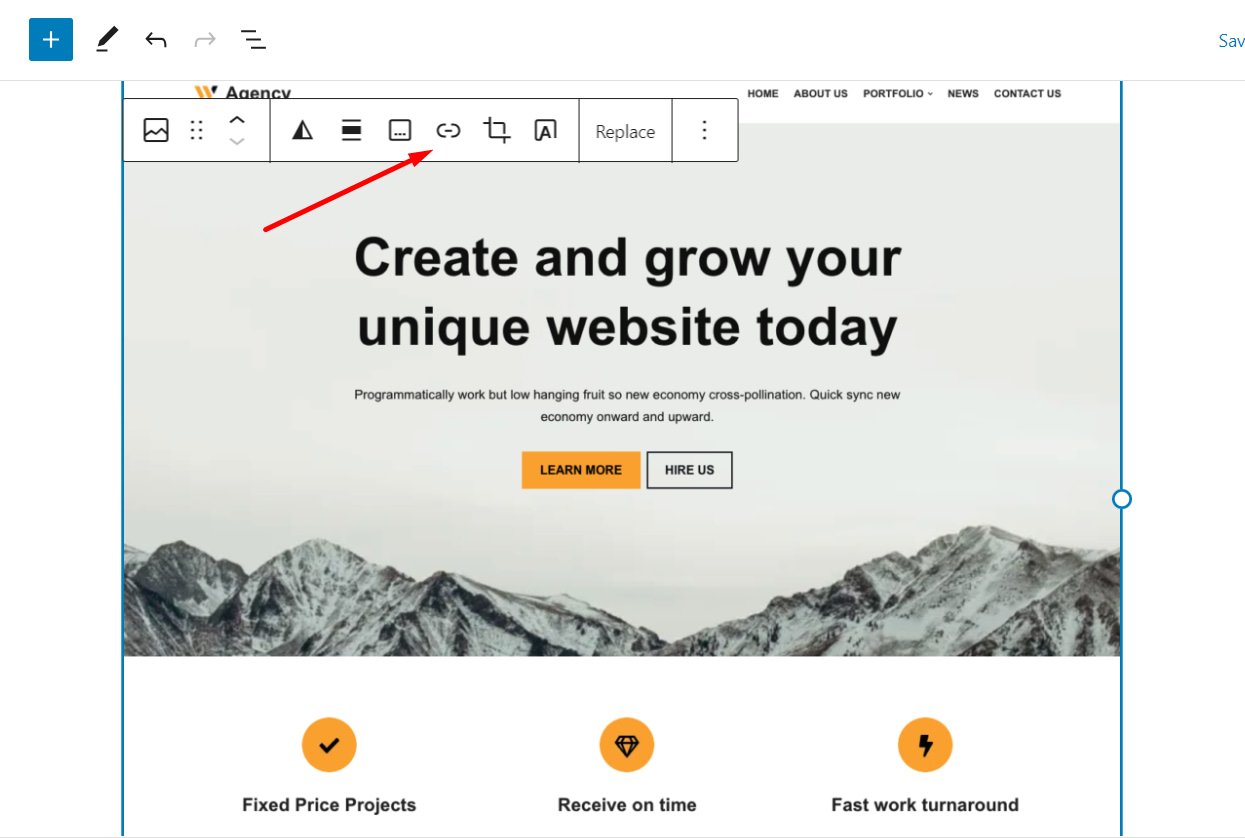
3. Once the image is successfully uploaded, **select it** and look for the Insert Link icon in the options bar.

4. **Click on the Insert Link icon**, and a field will appear where you can enter the desired URL. You have the flexibility to link the image to an internal WordPress post or page, an external website, or any other URL of your choosing.

5. After specifying the URL, **click on the Apply icon** to seamlessly integrate the image link into your WordPress content.

## The Multifaceted Applications of Image Links in WordPress

Now that you have a solid grasp of what image links are and how to create them, it’s time to explore their diverse array of applications:

1. **Linking to Other Posts or Pages:** Image links serve as efficient navigational tools, effortlessly directing visitors to related content within your website. This fosters increased user engagement and encourages exploration of your site’s offerings.

2. **Linking to Larger Image Files (Lightbox Effect):** Image links can be harnessed to create a captivating lightbox effect. When users click on an image link, it opens a pop-up window, allowing them to view larger versions of the image. This provides a more detailed and immersive experience, particularly useful for showcasing high-resolution images or galleries.

3. **Linking to External Websites:** Leveraging image links, you can effectively promote affiliate products, partnerships, or external resources by redirecting users to external websites. This broadens your reach and unlocks potential revenue opportunities, as well as collaborative prospects.

## SEO Considerations for Image Links

To maximize the potential benefits of image links and bolster your site’s online visibility, it’s essential to consider several key SEO factors.

Pay Writer

Buy author a coffee

Pay Writer
0 comments 0 FacebookTwitterPinterestEmail
developershohel

previous post
Using Divi AI to Completely Transform Your Divi Layout
next post
An Honest Comparison: Bluehost vs GoDaddy Hosting

Related Posts

How to improve Website Performance & Speed Up...

February 20, 2024

10 Best WordPress Image Optimization Plugins in 2024

February 20, 2024

Top 5 hosting to WordPress Staging Site with...

December 29, 2023

Writing a Blog Post Using AI in WordPress...

August 20, 2023

10 Useful Ways to Utilize AI in WordPress

August 19, 2023

Ultimate Guide on How to Add 2FA Authentication...

August 18, 2023

Comparison of the Top 6 Best WooCommerce Shipping...

August 18, 2023

Top 7 Link Tracking URL Shorteners for WordPress

August 18, 2023

2 Simple Methods to Highlight Text in WordPress

August 18, 2023

Comparison of the Top 5 Managed MySQL Hosting...

August 17, 2023

Leave a Comment Cancel Reply

Save my name, email, and website in this browser for the next time I comment.

* By using this form you agree with the storage and handling of your data by this website.

Weather

New York
overcast clouds
56%
3.6km/h
100%
-1°C
-1°
-3°
-1°
Wed

Recent Posts

  • How to improve Website Performance & Speed Up website

    February 20, 2024
  • 10 Best WordPress Image Optimization Plugins in 2024

    February 20, 2024
  • Top 10 Best WordPress Themes for Woocommerce in 2024

    January 1, 2024
  • How to use ftp or sftp server to transfer files in 2024

    December 30, 2023
  • Upload WordPress From localhost to live server in 2024

    December 30, 2023

STAY TUNED WITH US

Sign up for our newsletter to receive our latest blogs.

Get Best Web Hosting and Services for your Business

Hostinger

Hostinger

Bluehost

Bluehost

WP Engine

Name.com

Name.com

Resources

  • Developer Shohel
  • Url Shortener
  • All in One Online tools
  • Secure Cloud Storage
  • Books
  • Fashion Product
  • IT Blogger

Company

  • Privacy Policy
  • Refund Policy
  • Terms and Conditions
  • Cookie Policy
  • Contact us
  • About us

Most read

How to improve Website Performance & Speed Up website
February 20, 2024
10 Best WordPress Image Optimization Plugins in 2024
February 20, 2024
Top 10 Best WordPress Themes for Woocommerce in 2024
January 1, 2024
Codepen Blog | Top blogs for WordPress and Web Development
Facebook-f Twitter Instagram Linkedin Behance Github

@2024 – All Right Reserved. Designed and Developed by Developer Shohel

Codepen Blog
  • Home
  • About us
  • Contact us
Codepen Blog
  • Home
  • About us
  • Contact us
@2021 - All Right Reserved. Designed and Developed by PenciDesign

Read alsox

Gaining Expert Perspectives on the Evolving Search...

August 14, 2023

Exploring the Power of Python: A Comprehensive...

June 28, 2023

Unearthing the Concept of Decentralized Domain Name...

August 15, 2023
Sign In

Keep me signed in until I sign out

Forgot your password?

Do not have an account ? Register here

Password Recovery

A new password will be emailed to you.

Have received a new password? Login here

Register New Account

Have an account? Login here

Shopping Cart

Close

No products in the cart.

Return To Shop
Close