

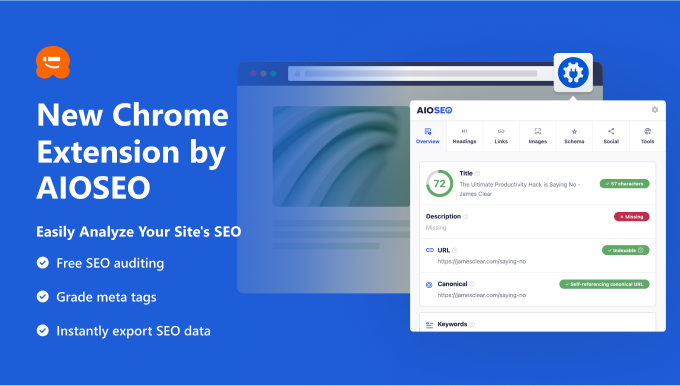
Are you grappling with the complexities and tedium of SEO? Have you ever yearned for a simpler way to pinpoint those small yet crucial SEO details so you can focus on what truly matters? The intricate web of minor SEO details can significantly impact your search rankings, but ensuring they’re in order can be a daunting task. Today, I am excited to introduce my latest creation, the All in One SEO Analyzer Chrome extension, designed to streamline your SEO analysis process with just a single click. Our goal is to help you reclaim valuable time by swiftly conducting SEO checks, allowing you to channel your energy into crafting outstanding content while our tool manages the nitty-gritty SEO intricacies.
## Introducing the All in One SEO Analyzer Chrome Extension
The All in One SEO Analyzer Chrome extension is a user-friendly, no-cost solution for instantly performing SEO audits on any website with unparalleled ease. Once you’ve added this extension to your Chrome browser, analyzing the SEO of any webpage is a breeze. Just visit the page you wish to scrutinize, click on the extension icon, and voila! You’ll receive a comprehensive SEO report for that specific page, covering the following aspects:
– An analysis of fundamental SEO elements like meta descriptions, titles, keywords, and content structure.
– An evaluation of your meta data SEO score, highlighting areas that may need further enhancements.
– Convenient access to your robots.txt file and your website’s sitemap.
– Detailed insights into heading tags, image SEO, internal and external links, schema markups, social media tags, and more.
In essence, the All in One SEO Analyzer Chrome extension provides instantaneous access to all your SEO particulars.
## Why Opt for the All in One SEO Analyzer Chrome Extension?
For most website owners, SEO is a complex puzzle due to the lack of a straightforward method to evaluate website SEO, unless they hire an SEO consultant or invest in costly software. Unfortunately, not everyone possesses the financial resources or budget for these options, thereby constraining their ability to enhance their websites and ascend the search engine ranks. Our mission is to change that paradigm. That’s precisely why we’ve developed a complimentary Chrome extension for SEO analysis, making it accessible to everyone. Our SEO extension simplifies rapid SEO assessments, empowering you to swiftly implement the necessary changes to your site.
## Effortlessly Generate SEO Audit Reports
Have you ever pondered if there’s room for SEO optimization to elevate your content’s performance? No matter how well-structured your content appears, there’s always room for improvement. With the AIOSEO Chrome extension, a single click suffices to analyze your entire page and generate an SEO audit report. This report helps you identify areas for improvement to bolster search rankings and boost organic traffic. Here are a few facets that our Chrome extension helps you scrutinize and enhance:
– SEO title and meta description: Optimize how your search results appear on search engine result pages to amplify click-through rates.
– Keywords and heading tags: Gain insights into the number of heading tags used and the keywords incorporated on your site.
– Image SEO: Discover the quantity of images used and whether they’re optimized with alt tags and titles.
– Internal and external link count: Get a quick overview of the total number of links employed on your site, both internally and externally.
– Schema.org data: Swiftly ascertain if you’re utilizing the appropriate Schema markup.
## Perform SEO Analysis on Any Website
One of the standout features of our Chrome extension is its versatility. It empowers you to assess the SEO of any website, be it your own or that of a competitor. It also provides an invaluable learning opportunity, allowing you to glean insights from the SEO strategies of your top competitors and industry peers. For example, you can visit a blog post you admire, click on the extension, and navigate to the Heading section. From there, you can hit the Export button to download all the headings used in that article in a convenient CSV file.
## Identify SEO Errors Within WordPress
Do you desire to conduct an exhaustive SEO audit and pinpoint critical errors directly from your WordPress dashboard? If so, we recommend installing the All in One SEO (AIOSEO) WordPress plugin. In addition to delivering a comprehensive report, this free plugin offers actionable suggestions for improvement. AIOSEO also offers a premium version brimming with advanced features, including a redirection manager, robust sitemap tools, schema markups, and more.
## What’s on the Horizon?
The All in One SEO Analyzer is a fantastic Chrome extension that can supercharge your website’s SEO strategy. While SEO demands time and dedication, armed with the right tools like our Chrome extension, you can expedite the process with swift SEO checks. While our Chrome extension provides an SEO report, if you’re seeking actionable insights to enhance your traffic and website, we encourage you to install the free All in One SEO plugin. In addition to SEO recommendations, it equips you with essential tools such as breadcrumbs and sitemaps to optimize your site comprehensively. We’re committed to crafting something truly exceptional, and we welcome your suggestions on how we can make the plugin even more beneficial for you. As always, we express our heartfelt gratitude for your unwavering support of WPBeginner, and we eagerly anticipate serving you for many more years to come.
