
Codepen Blog
  • Home
  • About us
  • Contact us
Codepen Blog
  • Home
  • About us
  • Contact us
Saturday, March 21, 2026
Top Posts
Top 10 AI Logo Generators in 2023 with the Majority Being...
Ultimate Guide to install and setup WordPress multisite
Upload WordPress From localhost to live server in 2024
Top 10 Best WordPress Themes for Woocommerce in 2024
Top 11 WordPress Mobile Plugin for Optimal Usage in 2024
The Ultimate Guide to Self-Hosted WordPress Website
Creating a Complete Homepage Using Divi AI – Step by Step...
SSH-ing into a Docker container: a step-by-step guide
How to use ftp or sftp server to transfer files in...
Top 5 hosting to WordPress Staging Site with plugins in 2024
SUBSCRIBE NEWSLETTERS
Codepen Blog
Codepen Blog
  • Contact us
Copyright 2021 - All Right Reserved
Blogs

Understanding the Menu Feature in WordPress

by developershohel July 11, 2023
written by developershohel July 11, 2023 Pay Writer
399

When it comes to building a user-friendly and navigable WordPress website, having a well-designed menu is essential. So, what is a menu in WordPress exactly? It’s basically a navigation tool that allows visitors to easily go through your website and find the content they’re looking for.

Table of Contents

Toggle
  • Understanding WordPress menus
    • How to use and create a menu
    • Pay Writer

In this blog post, we will explore the concept of a WordPress menu, its importance, and how to effectively use it to enhance the overall user experience.

Understanding WordPress menus

A WordPress menu plays a crucial role in organizing and presenting the various sections and pages of your website. It acts as a roadmap, guiding your visitors to the different areas of your site. A well-structured menu ensures that users can quickly find the information they need. And, it ultimately leads to improved engagement and a positive user experience.

WordPress offers different types of menus that you can customize to suit your website’s needs. The two main types are single-level menus and multi-level menus.

A single-level menu is a simple menu that displays all your website’s pages or categories on the same level. It is ideal for websites with a limited number of pages.

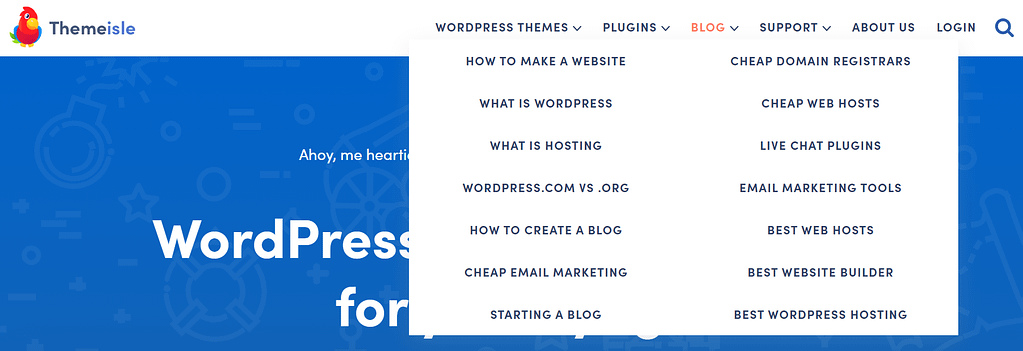
Meanwhile, a multi-level menu, also known as a dropdown menu, allows you to create submenus or nested menus within your main menu items. This type of menu is useful when you have a large number of pages or want to categorize your content into different sections. Visitors can hover over a main menu item to reveal a dropdown menu with additional links or options.

How to use and create a menu

Creating a menu in WordPress is a straightforward process. To get started, go to your WordPress dashboard and navigate to the Appearance section. From there, select Menus. You can create a new menu by clicking on the Create a new menu link. Give your menu a name and click on the Create Menu button.

Once you’ve created your menu, you can start adding items to it. You can add pages, categories, custom links, or even specific post types. WordPress provides a user-friendly drag-and-drop interface, allowing you to arrange the menu items in the desired order. You can also create submenus by dragging the items slightly to the right, creating a nested structure.

create wordpress menu

To place a menu on your website, WordPress provides various locations, depending on your theme. Common locations include the header, footer, sidebar, or as a mobile menu. You can select the desired location for your menu by checking the appropriate box in the Menu Settings section.

wordpress menu location

To add content or edit links in your menu, simply click on the item you want to modify. There is a possibility to change the navigation label, which is the text displayed in the menu, and the link itself. You can also choose to open the link in a new tab, add a title attribute for accessibility purposes, or remove the item from the menu altogether.

Pay Writer

Buy author a coffee

Pay Writer
Glossary
0 comments 0 FacebookTwitterPinterestEmail
developershohel

previous post
Step-by-Step Guide: Connecting Microsoft Outlook to WordPress
next post
Claim Your Free Esthetician Layout Pack for Divi

Related Posts

How to improve Website Performance & Speed Up...

February 20, 2024

10 Best WordPress Image Optimization Plugins in 2024

February 20, 2024

Top 5 hosting to WordPress Staging Site with...

December 29, 2023

Writing a Blog Post Using AI in WordPress...

August 20, 2023

10 Useful Ways to Utilize AI in WordPress

August 19, 2023

Ultimate Guide on How to Add 2FA Authentication...

August 18, 2023

Comparison of the Top 6 Best WooCommerce Shipping...

August 18, 2023

Top 7 Link Tracking URL Shorteners for WordPress

August 18, 2023

2 Simple Methods to Highlight Text in WordPress

August 18, 2023

Comparison of the Top 5 Managed MySQL Hosting...

August 17, 2023

Leave a Comment Cancel Reply

Save my name, email, and website in this browser for the next time I comment.

* By using this form you agree with the storage and handling of your data by this website.

Weather

New York
clear sky
63%
7.3km/h
2%
7°C
7°
7°
7°
Sat

Recent Posts

  • How to improve Website Performance & Speed Up website

    February 20, 2024
  • 10 Best WordPress Image Optimization Plugins in 2024

    February 20, 2024
  • Top 10 Best WordPress Themes for Woocommerce in 2024

    January 1, 2024
  • How to use ftp or sftp server to transfer files in 2024

    December 30, 2023
  • Upload WordPress From localhost to live server in 2024

    December 30, 2023

STAY TUNED WITH US

Sign up for our newsletter to receive our latest blogs.

Get Best Web Hosting and Services for your Business

Hostinger

Hostinger

Bluehost

Bluehost

WP Engine

Name.com

Name.com

Resources

  • Developer Shohel
  • Url Shortener
  • All in One Online tools
  • Secure Cloud Storage
  • Books
  • Fashion Product
  • IT Blogger

Company

  • Privacy Policy
  • Refund Policy
  • Terms and Conditions
  • Cookie Policy
  • Contact us
  • About us

Most read

How to improve Website Performance & Speed Up website
February 20, 2024
10 Best WordPress Image Optimization Plugins in 2024
February 20, 2024
Top 10 Best WordPress Themes for Woocommerce in 2024
January 1, 2024
Codepen Blog | Top blogs for WordPress and Web Development
Facebook-f Twitter Instagram Linkedin Behance Github

@2024 – All Right Reserved. Designed and Developed by Developer Shohel

Codepen Blog
  • Home
  • About us
  • Contact us
Codepen Blog
  • Home
  • About us
  • Contact us
@2021 - All Right Reserved. Designed and Developed by PenciDesign

Read alsox

Namecheap’s Tech Beat – June 30th, 2023

July 1, 2023

Understanding the Concept of a Cover Image...

August 11, 2023

The Ultimate Guide: Optimal Instagram Posting Times...

July 31, 2023
Sign In

Keep me signed in until I sign out

Forgot your password?

Do not have an account ? Register here

Password Recovery

A new password will be emailed to you.

Have received a new password? Login here

Register New Account

Have an account? Login here

Shopping Cart

Close

No products in the cart.

Return To Shop
Close