

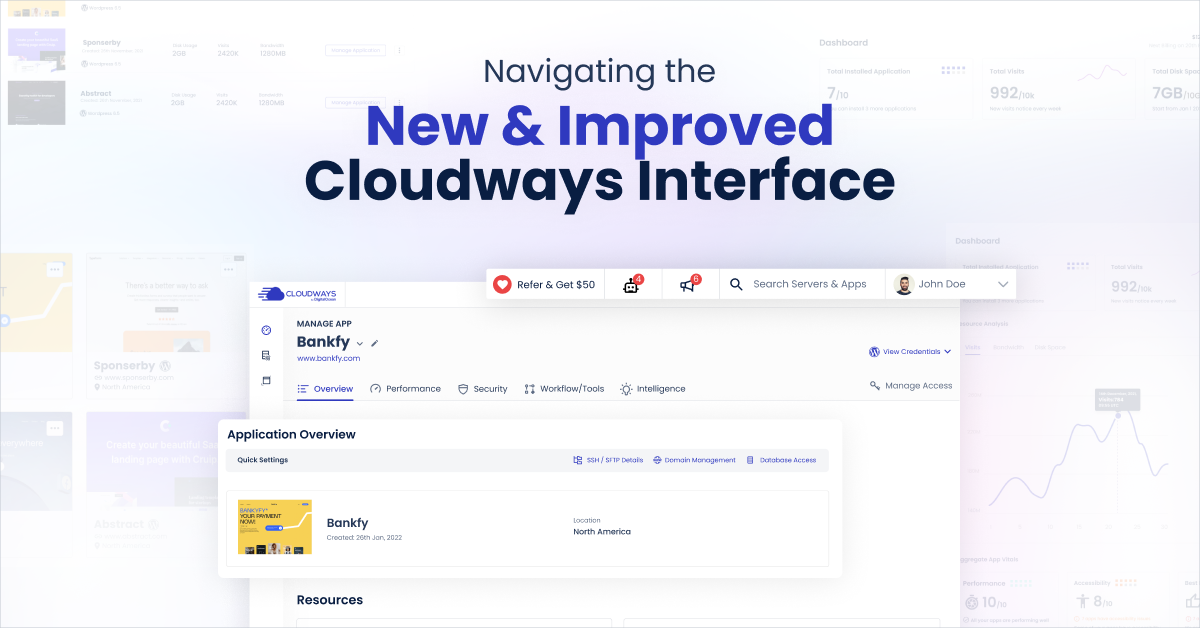
The evolution of Cloudways’ user interface reflects our unwavering commitment to cutting-edge UX practices. It all began with our 2017 UI overhaul, drawing inspiration from Google’s Material Design principles, which marked a significant leap forward. However, as we sought to transform Cloudways into an ecosystem that empowers users to “move their dreams forward,” we recognized the need for something more.
This is where Cloudways’ new Unified Interface enters the picture, a decision made in conjunction with the launch of our groundbreaking product, Autoscale in Beta. Autoscale is just the beginning of our journey towards creating a holistic ecosystem. To realize this vision, we required a design language that’s harmonious, scalable, and efficient. This is where “Atmosphere” comes into play, our tailor-made design system meticulously crafted to ensure flexibility, scalability, and optimum usability. “Atmosphere” brings a unified design language to our products, facilitating smoother workflows and granting you access to key features without the hassle of managing multiple contexts or logins. It also sets the stage for exciting future developments, so stay tuned!
So, how did we arrive at this design transformation? Rigorous research was our guiding star. We delved deep into our customers’ needs through a comprehensive “Jobs to be Done” (JTBD) study. Our journey included competitive analysis, user interviews, value proposition validation, usability tests, and audits. This wealth of data played a pivotal role in shaping our product design process, refining the product’s user experience, and ensuring the UI consistently met user expectations.
Now, join us as we introduce you to the new, unified, and enhanced user interface of Cloudways, designed with you at its core, and meticulously crafted to propel your dreams forward. Let’s step into the future of Cloudways together.
Let’s delve into the key highlights of this transformation:
**Welcome to Your New Dashboard:** Step into your new dashboard, a central hub that provides a consolidated overview of your Applications & Servers. Keeping tabs on your Cloudways Autoscale and Cloudways Flexible Applications is now effortlessly intuitive. The new dashboard also features a “Resource Center,” putting the help you need right at your fingertips.
**Global Side Navigation:** Positioned at the side for increased visibility and easy access to all Cloudways features is the new global navigation menu. It allows quick access to all Cloudways features, making it seamless to jump between different products and features, regardless of where you are on our platform.
**Enhanced Visual and Interactive Experience:**
– **Server Management:** The Manage Services & Settings and Packages page now boasts a visually-refreshed grid listing accompanied by intuitive logos, providing superior control and prioritization of core services.
– **Projects:** The refreshed look of our Projects feature, with the introduction of interactive accordions, ensures clutter-free navigation among different applications within a Project, enhancing both the visual aspect and ease of navigation.
**Immediate Access to Server/Application Credentials:** You no longer need to wait for a Server/Application operation to complete to access credentials. The redesigned interface allows you to view core and database details at any moment by simply clicking on the “View Credentials” link.
**Relocated Quick Actions:** Following valuable feedback from our users, Quick Actions have been moved from a floating icon to a custom dropdown in the header for prominent placement, ensuring you won’t miss out on these essential features.
**Customizable Views for Cloudways Autoscale Applications:** We’ve introduced a Grid view for Cloudways Autoscale Applications, providing a simplified overview. You can choose between two user-friendly views, List and Grid, depending on your convenience and preferences.
Our transformation is rooted in extensive research and benchmarking across seven key user journeys on a hosting platform. Participants in our study were individuals who had used Cloudways for three years and logged in approximately 45 times a month. We assessed factors like task usability, perceived ease of use, and aesthetic appeal.
Our robust usability score of 60 across these seven essential journeys showcases our unwavering commitment to enhancing the user experience. Users found our interface visually pleasing, as reflected in the attractive-usability effect. We’ve also considered your feedback, with over 20,000 users embracing our new interface and providing daily input, resulting in a glowing average rating of 4.07/5.
This achievement is a milestone but also a testament to our ongoing commitment to improvement. We aim to make your Cloudways experience even more productive and effortless, and your input is essential. We encourage you to submit your feedback or switch to the new interface and be part of the future of Cloudways.
With our new interface, you can now start creating web apps on managed cloud servers with ease, whether you’re an agency, developer, or part of the e-commerce industry. We’re excited to have you on this journey with us, and thank you for being a part of the Cloudways community!
